Wristotle by lazydevs
 There’s a new watchapp on the Rebble App Store!
Go check it out in the App Store!
There’s a new watchapp on the Rebble App Store!
Go check it out in the App Store!
 Aplite screenshots:
 Basalt screenshots:
 Chalk screenshots:
 Diorite screenshots:
 Emery screenshots:
 Flint screenshots:
 Gabbro screenshots:
 Update alert!
 lazydevs just released version 0.3.1 of Wristotle!
fix: cancel processor companion-response timeout on app deinit
 Update alert!
 lazydevs just released version 0.4.0 of Wristotle!
Voice notes on your watch. Take a note by voice, then browse and open them right from the watch.
What’s new
- On-watch Notes list — long-press UP from the chat screen to see your recent notes. Tap any one to read the full text.
- Quick Launch action — choose what your Quick Launch shortcut does: Dictate, Notes, or Show menu (a chooser with both). Set it
from the companion’s Watch settings or the BLE companion’s settings screen.- Clearer chat empty-state — the home screen now spells out the buttons (SELECT to speak, hold UP for notes, UP/DOWN to scroll)
so the new gesture is easy to find.Fixes
- “Skip retry dialog” toggle now actually persists — it was previously a silent no-op.
- “Show menu” Quick Launch option no longer falls back to Dictation.
- Debug logging now defaults off, matching the companion settings page.
Needs the latest companion
Install or update Wristotle Companion v0.5.0 on your phone to use Notes — the watch app shows the list, but the companion is where notes are actually stored.
Releases - wristotle/wristotle-companion - Codeberg.org
 Update alert!
 lazydevs just released version 0.5.0 of Wristotle!
v0.5.0 — Confirm before send
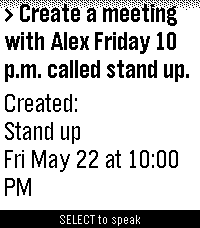
A new opt-in safety net for voice commands. When you turn on Confirm before send in the companion’s Watch settings, any command that does something — call a contact, send an SMS, set / cancel / reschedule a reminder, schedule a meeting, open an app, start media playback — pauses on the watch with a clear summary first:
Action: text
Details:
[Mom] hiPress SELECT to go ahead, BACK to cancel. The countdown is configurable in the companion (5 s / 10 s / 15 s / 30 s / 1 min / Never), and the auto-resolve action is your choice — cancel by default, or send through.
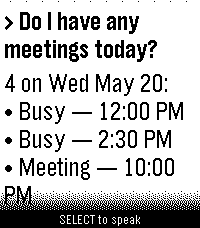
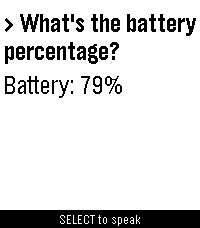
Read-only commands (time, battery, what’s on my calendar, pause, next, find phone, list reminders) skip the prompt and dispatch as before.
Off by default. Pair with companion v0.7.0 — both apps need to be on this release for the new prompt protocol to work.
 Update alert!
 lazydevs just released version 0.5.1 of Wristotle!
Bug-fix release: “remind me …” and “cancel …” commands now correctly trigger the Confirm before send prompt (they were silently bypassing it). Pairs with companion v0.8.1+.
Update alert! lazydevs just released version 0.6.0 of Wristotle!
v0.6.0 — Tasks
A new voice-controlled checklist for your Pebble. Long-press DOWN on the chat screen to open Tasks — pick Pending, Completed, or All; tap SELECT to mark a task done with a quick buzz. Completed rows show with for a clear “All” view.
Add, list, complete, and delete tasks by voice via Wristotle Companion: “add task buy milk” / “what are my tasks” / “complete buy milk” / “delete task buy milk”. “Complete the last task” picks the newest pending one without restating it.
Requires Wristotle Companion v0.9.0+ on Android — install both together (they talk via new wire keys).
Update alert! lazydevs just released version 0.6.1 of Wristotle!
v0.6.1 — Alarm & timer commands reach the phone.
Paired with Wristotle Companion v0.11.0, which adds voice alarms and timers.
- The watch no longer answers “set a timer for 10 minutes” with the current time. Commands mentioning a timer (or alarm) now forward to the companion, which sets them in your phone’s clock app.
- “what time is it” still answers instantly on the watch — only genuine timer/alarm phrases get forwarded.
Update the companion app to v0.11.0+ to use the new voice alarms and timers (“set an alarm for 7am”, “set a timer for 10 minutes”).
Update alert! lazydevs just released version 0.7.0 of Wristotle!
v0.7.0
• World clock — ask “what time is it in Tokyo” (any city or country) and get the time there, plus the day and hours ahead/behind your own zone.
• Voice calculator — quick maths like “what’s 15% of 80”, “25 plus 17”, or “96 divided by 4”.
• “Thinking…” indicator — the watch now shows it’s working (and buzzes if it’s taking a while) while it waits for your phone.World clock and the calculator are answered on-device by Wristotle Companion v0.12.0 — update both.
Update alert! lazydevs just released version 0.7.1 of Wristotle!
v0.7.1
- Weather — ask “what’s the weather in Tokyo” (any city, country, or abbreviation) or just “what’s the weather” for your current location. Short condition + temperature on the watch.
- Choose your provider in the companion: open-meteo by default (free,no key needed) or OpenWeather with your own free-tier API key for direct control over your quota.
- C / F toggle in the same Settings card.
Needs Wristotle Companion v0.13.0 — update both. The bare “what’s the weather” form uses your phone’s last-known location if you grant the optional Location permission.
 Update alert!
 lazydevs just released version 0.8.0 of Wristotle!
v0.8.0
• Ask Agent — say “ask agent ” / “ask claude ” to call any configured LLM (Anthropic / OpenAI / OpenRouter / Ollama / …). The watch shows a per-tool status line while the agent runs.
• MCP tool support — the Ask Agent can call tools from any HTTP MCP server (e.g. GitHub) configured in the Companion’s Settings → MCP servers.Requires Wristotle Companion v0.14.0 — update both.
 Update alert!
 lazydevs just released version 0.9.1 of Wristotle!
Wristotle 0.9.1 — configurable chat buttons + polish
Each chat-surface button is now user-bindable: SELECT, long-press UP, and long-press DOWN can open Dictation, Quick menu, Notes, or Tasks. Configure via the Pebble app settings or the Wristotle Android companion.
This release also cleans up the empty-state welcome and adds a thin progress strip above the hint line that animates while a query is in flight.
Requires Wristotle Companion v0.17.0 — update both.
Update alert! lazydevs just released version 0.10.0 of Wristotle!
Wristotle 0.10.0 — alarms on the watch + phone
Companion-created alarms (Settings → Alarms & Reminders) now ring on the watch with vibration + dismiss. New on-wrist alarm list shows pending alarms with per-row cancel.
Bind SELECT, long-press UP, or long-press DOWN to “Alarms” to open the list directly, or pick it from the Quick menu (now 4 rows: Dictation / Notes / Tasks / Alarms).
Pairs with Wristotle companion v0.18.0.
Update alert! lazydevs just released version 1.0.0 of Wristotle!
v1.0 — leaving alpha
• First-launch setup wizard walks you through Whisper + intent model downloads, permissions, and app indexing
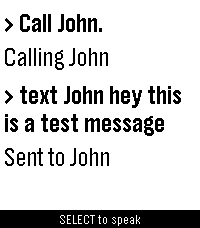
• Voice commands: calls, texts, reminders, alarms, music, notes, tasks, weather, world clock, calculator, Ask-Agent
• On-device speech by default; cloud STT and LLM are optional
• Works with microPebble + Core Devices (rePebble)Requires the Wristotle Android companion app — https://wristotle.codeberg.page/
Update alert! lazydevs just released version 1.0.1 of Wristotle!
v1.0.1
- Fixed: Quick Launch mode now lets you scroll long Ask-Agent responses with UP / DOWN. Pressing scroll also resets the auto-exit timer so the response can’t disappear while you’re reading (issue #1).
Update alert! lazydevs just released version 1.1.0 of Wristotle!
v1.1.0
• Per-row icons — every list on the watch (Notes, Tasks, Alarms, Quick Launch chooser) now shows an entity glyph at the start of each row, and the empty states keep the icon so the screen still reads as itself. Try “take a note about lunch” to see it.
• Chat bubbles — each query and its reply sits inside a rounded outline, so the conversation reads more clearly. Try “what’s the weather”.
• Optional color theme — color-capable watches (Time, Time Steel, Time Round, Time 2, Emery) can now light up colored row icons, a softer menu highlight, and warm yellow chat bubbles. Off by default; flip the switch in the Wristotle Companion app (Settings → Watch → Color theme). Pebble Classic and Pebble 2 are unaffected.
• Quick chooser fixed — picking “Dictation” from the chooser menu now actually starts dictation. Previously it silently failed.
Color theme needs Wristotle Companion v1.3.0 — update both.
Update alert! lazydevs just released version 1.2.0 of Wristotle!
v1.2.0
• Speak replies on the watch (Experimental). Pebble Time 2 and Pebble Round 2 only — the two models with a built-in speaker.
• Requires Wristotle companion v1.7.0+ on the phone. Configure under Settings →Speech in the companion app.
• Off by default. Pick which voice replies should speak per intent (Ask Agent, morning brief, weather, reminders…).
Update alert! lazydevs just released version 1.2.1 of Wristotle!
v1.2.1
Fixes the original Pebble 2 / Pebble 2 HR losing connection to the companion after the v1.2.0 update. If you’re on a Pebble 2 or 2 HR, please update.
Requires the Wristotle Android companion app — https://wristotle.codeberg.page/
Update alert! lazydevs just released version 1.3.0 of Wristotle!
Wristotle v1.3.0 — Cards on your wrist
Replies now appear as full-screen cards: a coloured band shows the action (green = add, red = delete, blue = lookup…) and an icon shows the feature.
• Sports, weather, and meetings show as cards by default
• New rich weather card — temperature, condition, humidity, and wind at a glance
• Pick which replies become cards in the companion app (Settings → Watch) — reminders, tasks, notes, alarms and moreRequires the Wristotle Android companion app.
Update alert! lazydevs just released version 1.3.1 of Wristotle!
v1.3.1
Clearer dictation feedback: when voice input can’t start
or comes back empty, the watch now tells you what to
check — e.g. that dictation is off or not set up in your
Pebble app — instead of always showing “Didn’t catch
that.”Requires the Wristotle Android companion app.
Update alert! lazydevs just released version 1.3.3 of Wristotle!
v1.3.3
- Fixed: dictation could fail with “Dictation unavailable” on the smaller watches (Pebble 2, Pebble 2 Duo, Pebble Time, Pebble Time Round) after the v1.3.0 cards update — freed up watch memory so it works again.
- Improved: if dictation can’t start at all, the watch now tells you instead of waiting silently.
- Internal: the watch reports its version to the companion so it shows
in bug-report diagnostics (faster issue triage).Requires the Wristotle Android companion app.