Ultra by EC Apps
 There’s a new watchface on the Rebble App Store!
Go check it out in the App Store!
There’s a new watchface on the Rebble App Store!
Go check it out in the App Store!
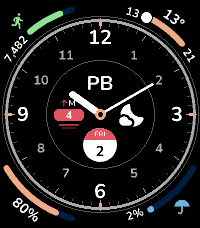
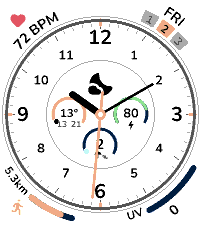
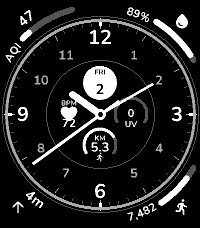
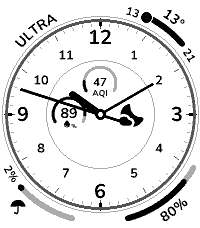
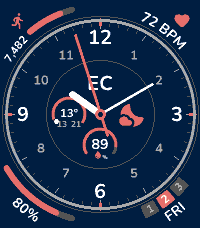
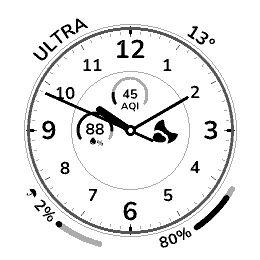
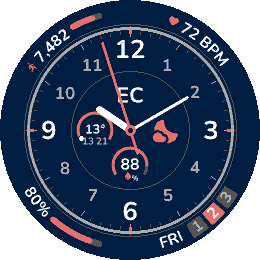
 Emery screenshots:
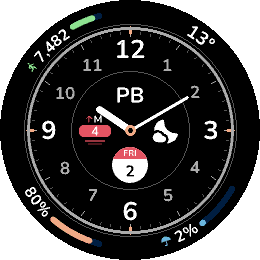
 Gabbro screenshots:
 Update alert!
 EC Apps just released version 1.1.0 of Ultra!
- Custom complications
- Wind Speed
- Sunset/Sunrise
- .beat time
 Update alert!
 EC Apps just released version 1.2.0 of Ultra!
- New colors for some complications: Distance, Calendar, Sunset, Temperature, Battery
- New design for AQI and UI complications
- Fixes
 Update alert!
 EC Apps just released version 1.5.0 of Ultra!
- Ring styles: new Ring setting with Default, Minimal (ticks only), Sport (white band, minute numerals, accent ring) and Chronograph (black-and-white band, hours 1 to 12).
- Bigger center: on Minimal, Sport and Chronograph the subdials grow to fill the larger center and the hands run longer.
- More hand styles: Pointer, Sword and Dauphine, next to Line, Bar and Outline.
- Calories: new complication, as a total (active and resting) or active only, in corners and subdials.
- AQI and UV gauges: air quality and UV index as a range gauge, as well as sections.
- Smaller % sign in subdial values, and in corner values on round watches.
- Hand styles: Line, Bar or Outline for the hour and minute hands.
- Hand colors: a color each for the hour, minute and seconds hands. The seconds color is also the 12, 3, 6 and 9 notches’.
- Fixes: sunrise and sunset subdial at night, weather icon on the round watch, hour hand length.
Update alert! EC Apps just released version 1.6.0 of Ultra!
- Band color: pick the band’s color on the Sport, Chronograph, Tachymeter and Compass rings. Ticks and numerals turn black or white to stay readable on it.
- Roman ring: new Roman ring, the Default dial with its hours in Roman numerals, turned along the dial.
- Tachymeter ring: new Tachymeter ring: ticks for the seconds around the edge, and inside them a colored band with 10 to 60 and a dot between each. The band follows the seconds color, or takes its own.
- Compass ring: new Compass ring, a compass bezel: N, E, S and W and the degrees between, 30 to 330, on a band, a tick every 5 degrees. It is fixed and does not turn to north. The band takes a color.
- No hands: new None hand style hides the hour and minute hands, for a face that tells the time in a complication. The seconds hand keeps its own switch.
- Sweeping seconds: new switch under Seconds hand. The hand glides, 8 steps a second, instead of ticking. It drains the battery much faster.
- Seconds hand rests: it stops during Quiet Time and at 20% battery or less, and comes back on its own.
- Shake to hide hands: new switch, under Experimental. Shake the watch twice and the hands step aside for 5 seconds, so the center complications show whole.
- New complications: digital time, time zones (one per slot, picked by abbreviation: PST, CET, IST), sleep last night, active minutes and moon phase. All in corners and subdials.
Week and Year progress: two new complications. Week: seven sections, Monday first, lit up to today, with the weekday and the day. Year progress: a bar of how much of the year is gone.- Location: new complication with the city your phone is in: its name in a corner, a short code (SEA, NY) in a subdial. Named by BigDataCloud, asked only while the complication is on the face.
- Date: the Calendar complication is now Date, with a format per slot: Calendar (as before), Weekday and day, Month and day, Full date, Numeric, Week number, Day of year or Year. Calendar (plain) is now Date as Weekday and day; a face showing it keeps its look.
- Calories bar: both calories complications now show a bar, in corners and subdials. Like distance, it fills with progress toward the daily step goal.
- Fewer picks, same complications: Air quality, UV index and Calories are one pick each. A second picker beside it sets the kind: Sections or Gauge, Total or Active. Saved faces keep theirs.
- Grouped pickers: the complication dropdowns are sorted into Activity, Weather, Time and date, Sun and moon, Place, Watch and Custom.
- Preview fills in: pick a complication the phone has not fetched for yet (air quality, location, wind) and the settings preview draws it with sample values, not --.
- Weather refresh: pick how often the weather refreshes, from 15 minutes to 3 hours.
- Weather location: search a city and pick it, for weather somewhere other than where the phone is. The phone’s position is then not asked.
- Lighter on the battery: the face is drawn again only when something on it changed, not every minute, and only the hands move in between (on the round watch, with Line or no hands). Heart rate redraws on a change of 3 bpm, total calories every 10. The phone asks for weather, air quality and the place only when a complication showing them is on the face.
- Battery saver: new switch, under Experimental. After an hour with no steps and no pulse, the face sleeps: one redraw an hour, no seconds hand, weather and custom complications once an hour. A step, a pulse or a shake wakes it.
 Update alert!
 EC Apps just released version 1.7.0 of Ultra!
- Settings on Android: the settings page no longer jitters or sticks at the top when you scroll past the preview.
Update alert! EC Apps just released version 1.9.0 of Ultra!
- Minimal ring: the hour hand is 15% shorter, so it no longer reads like the minute hand.
 Update alert!
 EC Apps just released version 2.0.0 of Ultra!
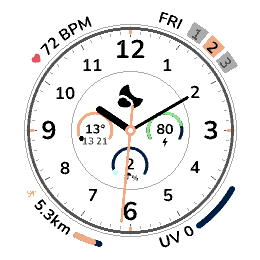
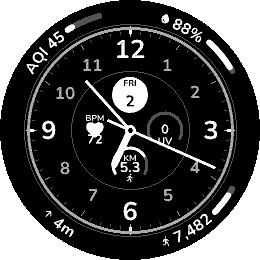
- Older watches: Ultra now runs on the Pebble Time, Pebble Time Round, Pebble 2 and Pebble 2 Duo. They have no corner complications.
- New settings page
- Rectangular ring: on the Pebble Time, Pebble 2 and Pebble 2 Duo, a new switch under Ring makes the ring follow the screen’s edge.
- Joined corners: two corners can now be one complication, its bar or gauge running on through the gap between them. On the Time 2, join the top two, the bottom two, or both. On the Round 2, join any neighbors.
- Wider corners on the Round 2: each corner complication now spans 65 degrees, centered on its corner, up from 45.
- Outlined hands: every hand style, the seconds hand and the pin have a thin outline in the background color.
- Weather in the corners: the Weather complication now fits a corner too.
- Weather with temperature: Weather gets a second kind, Icon + temp.
- Temperature gauge on the Round 2: the Temperature corner is a gauge again, now that the corners have room.
- Languages: the face and the settings page in English, French, German, Dutch, Italian or Spanish.
- Accented letters: the watch font has them now (É, Ä, Ñ, Ü, Ã, Ø, Å, Œ…).
- Hourly rain: Chance of rain gets a second kind of complication.
- Days until / since: a new complication counts the days to a date, or since it once it has passed.
- Month, week and day progress: Year progress is now Progress, with four kinds: Year, Month, Week and Day.
- Week starts on: a new setting under Data, Monday, Sunday or Saturday.
- Pressure: a new weather complication, sea-level pressure.
 Update alert!