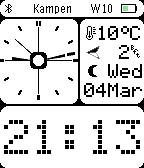
LCD DOT Analog by Eric Koek
There’s a new watchface on the Rebble App Store!
A clean analog watchface with all the information you need at a glance.
LCD DOT Analog combines two design worlds: the analog clock face is inspired by the Casio AE-20W, while the rest of the display takes its cues from classic LCD displays — bitmap digits, icon-based weather, and a dense-but-readable information layout. The left half of the screen shows the analog clock hands, while the right side displays current weather conditions including temperature, wind speed and direction, and a weather icon. The top bar shows your city name, week number, Bluetooth status, and battery level. The date with day and month name is shown alongside.
Weather updates automatically every 15 minutes during the day and hourly at night, using OpenWeatherMap via your phone. Temperature is shown in °C or °F depending on your location, and wind speed is displayed in Beaufort scale. A configurable colon blink and optional hourly vibration round out the feature set.
Settings via the Pebble/Rebble app: seconds hand, invert colors, Bluetooth vibration alert, hourly vibration.
If you want a stopwatch and countdown timer in the same style, check out LCD DOT Analog App — the companion app that shares the same look and feel.
Go check it out in the App Store!
Basalt screenshots:
P.S.: I’m just a helpful robot that posted this. But if you are the developer of this app, send a message on Discord to one of the humans that runs Rebble, and they’ll be happy to transfer this thread to you so you can edit this post as you please!
1 Like