Info Dashboard by HalfTick Labs
 There’s another cool watchface on the Rebble App Store!
Go check it out in the App Store!
There’s another cool watchface on the Rebble App Store!
Go check it out in the App Store!
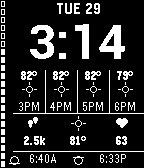
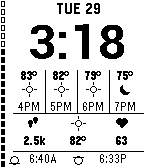
 Diorite screenshots:
 Update alert!
 HalfTick Labs just released version 1.0.1 of Info Dashboard!
Introduces a cleaner radiant sun icon for clear and partly cloudy daytime conditions.
Update alert! HalfTick Labs just released version 1.1.0 of Info Dashboard!
Version 1.1.0
Info Dashboard is now far more customizable:
- Added automatic, Fahrenheit, and Celsius temperature units
- Added system, 12-hour, and 24-hour time formats
- Added three date formats
- Added three forecast-spacing options
- Added 30, 60, and 120-minute weather refresh intervals
- Added configurable left and right dashboard fields
- Added segmented, solid, percentage, and combined battery styles
- Added sunrise/sunset, weather-update time, and hidden bottom-row options
- Added options to hide weather icons and disable disconnect vibration
- Updated the sun icon for improved clarity
- Improved weather caching and stale-data detection
 Update alert!
 HalfTick Labs just released version 1.2.1 of Info Dashboard!
More ways to make Info Dashboard yours. This update adds matching choices for all three dashboard positions, with 14 data options ranging from health and weather to battery, connection status, sunrise, and sunset. It also expands the date selector to 10 compact formats, including month-first, day-first, padded, weekday, and ISO layouts.
 Update alert!
 HalfTick Labs just released version 1.2.2 of Info Dashboard!
The bottom row is now optional. Turn off sunrise and sunset information to expand the main dashboard and shift the date, time, forecast, and dashboard fields down into the available space. You can still display sunrise and sunset or the last weather update time when preferred.
 Update alert!
 HalfTick Labs just released version 1.2.3 of Info Dashboard!
Date remains locked at the top in both layouts.
Connection indicator remains aligned with the date.
Expanded mode lowers the clock, forecast, and dashboard fields.
The clock is centered within the additional space below the fixed date.
Update alert! HalfTick Labs just released version 1.2.4 of Info Dashboard!
Improved the optional expanded layout. The date now remains fixed at the top, while the clock is vertically balanced between the date and forecast. This creates even visual spacing without changing the standard layout or the full-height battery rail.