Kurzbeschreibung (EN)
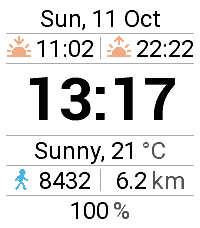
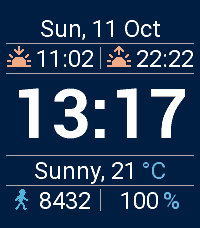
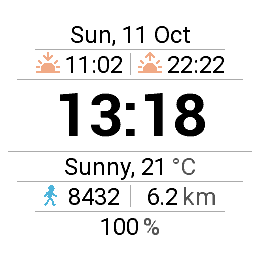
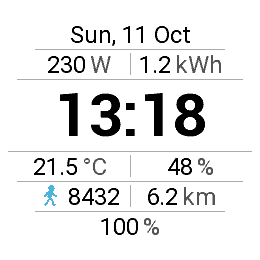
Your Home Assistant sensors next to the time – with weather, sunrise/sunset, steps and battery.
Kurzbeschreibung (DE)
Deine Home-Assistant-Sensoren neben der Uhrzeit – mit Wetter, Sonnenzeiten, Schritten und Akku.
Beschreibung (EN)
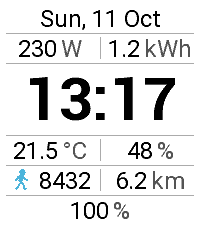
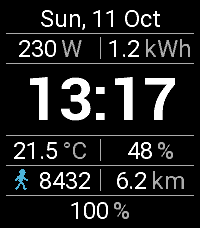
HA Watch Custom shows the time together with the data that matters to you – straight from your Home Assistant.
Features
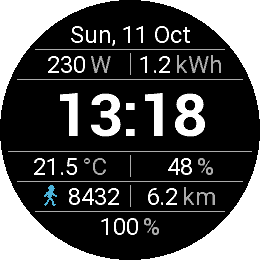
Up to six Home Assistant sensors in three freely configurable lines (two per line)
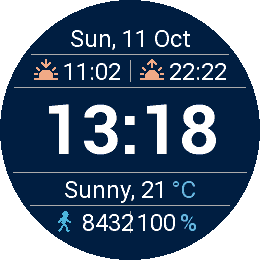
Weather from Open-Meteo or from any Home Assistant weather entity
Sunrise and sunset, steps and distance (Pebble Health), battery level
Show battery and steps in a single line
Phone battery next to the watch battery (only if the Pebble app provides it)
English or German, automatic language selection
24 h, 12 h or follow the watch; several date formats
Choose background, time, info and accent colors from the Pebble palette
Roboto Bold or Roboto Regular time font; the time grows automatically when you hide lines
Independent refresh intervals for Home Assistant and weather (1–120 minutes)
Your last layout is stored on the watch, so the face looks right immediately
Setup
Based on HA Watch by Axel Kark (MIT license). Uses its own UUID, so it can be installed alongside the original.
Beschreibung (DE)
HA Watch Custom zeigt die Uhrzeit zusammen mit den Daten, die dir wichtig sind – direkt aus deinem Home Assistant.
Funktionen
Bis zu sechs Home-Assistant-Sensoren in drei frei konfigurierbaren Zeilen (zwei pro Zeile)
Wetter von Open-Meteo oder aus einer beliebigen Home-Assistant-Wetter-Entität
Sonnenauf- und -untergang, Schritte und Entfernung (Pebble Health), Akkustand
Akku und Schritte wahlweise in einer gemeinsamen Zeile
Handy-Akku neben dem Uhrenakku (nur wenn die Pebble-App ihn bereitstellt)
Englisch oder Deutsch, automatische Spracherkennung
24 h, 12 h oder Einstellung der Uhr; mehrere Datumsformate
Hintergrund-, Zeit-, Info- und Akzentfarbe aus der Pebble-Palette
Zeitschrift Roboto Fett oder Regular; die Uhrzeit wächst automatisch, wenn Zeilen ausgeblendet werden
Eigene Aktualisierungsintervalle für Home Assistant und Wetter (1–120 Minuten)
Das zuletzt gewählte Layout wird auf der Uhr gespeichert, das Zifferblatt erscheint sofort korrekt
Einrichtung
Basiert auf HA Watch von Axel Kark (MIT-Lizenz). Eigene UUID – lässt sich neben dem Original installieren.
Release Notes 2.0.3 (EN / DE)
Fixed “Alloy Fatal Error: Memory Full” (only one large time font is kept in memory now) / „Memory Full“-Absturz behoben (nur noch eine große Zeitschrift im Speicher)
Watchface no longer crashes back to another face after returning from the menu; drawing errors are caught / Watchface fällt nach dem Menü nicht mehr auf ein anderes Face zurück; Zeichenfehler werden abgefangen
Smaller font glyph sets to reduce RAM use / Kleinere Zeichensätze, weniger Speicherbedarf
New option: battery and steps in one line / Neue Option: Akku und Schritte in einer Zeile
New option: phone battery (if available) / Neue Option: Handy-Akku (falls verfügbar)
Go check it out in the App Store!
Expand
P.S.: I’m just a helpful robot that posted this. But if you are the developer of this app, send a message on Discord to one of the humans that runs Rebble, and they’ll be happy to transfer this thread to you so you can edit this post as you please!
 There’s a new watchface on the Rebble App Store!
 Emery screenshots:
 Gabbro screenshots: