Vocab Learner by Mo
There’s a new watchapp on the Rebble App Store!
Go check it out in the App Store!
There’s a new watchapp on the Rebble App Store!
Go check it out in the App Store!
Mo just released version 1.1 of Vocab Learner!
Release Notes: v1.1.0
Welcome to the newest release of Vocab Learner for Pebble!
This update brings more control over your learning experience and significantly improves how background notifications work.
What’s New in v1.1.0
True Background Notifications (Timeline Pins)
- We have completely rewritten the background reminder system. The app now pushes Pebble Timeline Pins directly to your watch instead of using the local Wakeup API.
- You will now receive proper popup notifications reminding you to review your vocabulary. You can simply dismiss the notification to review it later, or select “Open App” to jump right into a review session!
- Note: You must enable “Timeline” permissions for this app when installing.
Difficulty Levels Configuration
- You can now filter which words you want to study directly from the Companion App Settings! Choose to study Basic, Intermediate, Advanced words, or any combination of the three.
Core Features
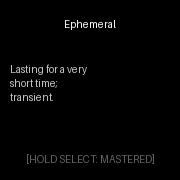
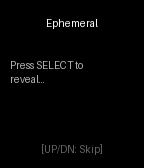
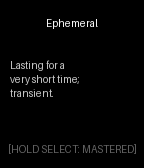
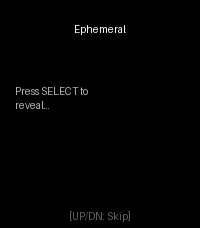
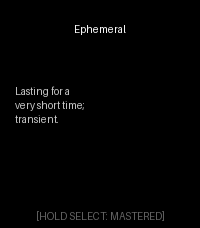
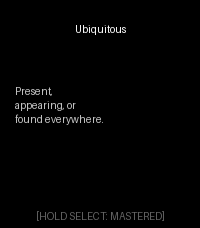
- Leitner Spaced Repetition System (SRS): The app uses a built-in persistent memory engine to track your progress. Long-press
SELECTwhen you know a word to advance its bucket, and the app will automatically schedule it for review in 10 minutes, 4 hours, or up to 3 days later!- Pure Minimalist Design: The UI has been stripped of all distracting elements. With a deep black
GColorBlackbackground and massive24pxbold fonts, 55% of the screen is dedicated entirely to the definition.- Offline First: The entire vocabulary database is baked natively into the lightweight C application. It requires absolutely zero internet connection or phone tethering to review your words.
Mo just released version 2.1 of Vocab Learner!
Release Notes: v2.1.0
This release removes the word-count ceiling. The vocabulary database moved out of the app binary (which is copied into the watch’s limited RAM) and into the 256KB resource bank, read on demand — one word in memory at a time.
What’s New in v2.1.0
Resource-Packed Vocabulary Database
Words are now packed into a binary resource (vocab_db.bin) generated from resources/vocab_db.json and read with resource_load_byte_range(). App RAM usage no longer grows with the word list.
New capacity: ~1,800 words on Pebble Time/2/Round (up from a few hundred), 400 words on the original Pebble (up from 50). Growing the list is now just editing the JSON.
SRS progress is stored in a packed 2-bytes-per-word format (schema v3) so even a 1,800-word deck fits Pebble’s 4KB persistent-storage quota. Existing v2.0 (and v1.x) progress migrates automatically.Under the Hood
New src/c/vocab.c runtime accessor (offset index + difficulty table in a few KB of heap; single 512-byte record buffer).
tools/generate_vocab.py now emits the binary blob (plus a trimmed ~aplite variant automatically when the list outgrows the original Pebble).
Word content is unchanged in this release (234 words) — this is the scalability release; big word-pack drops can now follow without any code changes.Release Notes: v2.0.0
The biggest update yet: the spaced repetition engine now works both ways, the word database grew more than 10x, and the whole app got a battery and UX overhaul.
What’s New in v2.0.0
The SRS Finally Learns What You Struggle With
New grading action — HOLD DOWN = “I forgot”: resets that word’s Leitner bucket so it comes back for review immediately. Previously the engine could only promote words, never demote them; now it truly adapts to you.
Skipping respects your schedule: UP/DOWN now show another random due word instead of walking the raw list, and always honor your difficulty filter.
“All caught up” screen: when nothing is due, the app tells you — plus when your next word arrives — instead of force-feeding words ahead of schedule.
234 Words (Up From 20)
The vocabulary database grew to 234 curated words across 8 categories (General, Academic, Business, Science, Law, Arts, Nature, Emotions) and 3 difficulty levels.
resources/vocab_db.json is now the single source of truth; vocab.h is generated at build time by tools/generate_vocab.py.
Your existing progress on the original 20 words migrates automatically.
Battery & Correctness
The app now wakes once per minute instead of once per second — a meaningful battery win on a wearable.
Timeline pins no longer duplicate: pins use stable slot IDs that overwrite on refresh, are only pushed when you save settings, and are deleted when you disable notifications.
SRS progress is stored in chunked, versioned records — safe past Pebble’s 256-byte persist limit, with room to grow the word list further.
Lifetime stats (Mastered / Reviewed / Graduated) now persist across launches.
The settings page now shows your actual saved settings instead of defaults.
Minimalist UI Upgrades
Leitner progress dots: five tiny dots under the term show how close a word is to graduating.
Mode dots: four dots at the bottom edge show which view you’re on (meaning / example / origin / phonetic).
Grading flash: a brief screen flash confirms a “mastered” grade registered.
Hints retire themselves: button hints show for your first 10 launches, then disappear — pure black thereafter.
Long definitions auto-shrink to fit; round (Chalk) displays get centered, inset text.Button Map
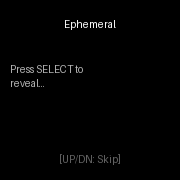
SELECT: reveal / cycle meaning → example → origin → phonetic
HOLD SELECT: I know this word (promote)
HOLD DOWN: I forgot this word (reset)
UP / DOWN: show another due word
HOLD UP: learning stats
Mo just released version 2.2 of Vocab Learner!
Release Notes: v2.2.0
Quality-of-life release: calm timeline, a proper phone app, and no more clipped words.
What’s New in v2.2.0
Timeline That Doesn’t Spam
One pin per day instead of one per interval. Hourly reminders used to put 24+ pins in your timeline; now a single daily pin carries up to 3 reminder pop-ups.
Waking window: choose “not before / not after” hours (default 9:00–21:00) so reminders never land at 3 AM.
Legacy interval pins from v2.0/v2.1 are cleaned up automatically.
A Real Phone App
Live stats on the settings page: Mastered, Reviewed, and Graduated sync from the watch every time you open the app.
Reset progress: erase all SRS levels and stats from the settings page (with confirmation).
Cleaner sectioned layout: Reminders / Study / Progress / Danger zone.
Watch Fixes
Long words fit: terms like “Quintessential” now auto-shrink through a font ladder instead of clipping with a dash.
New launcher icon: bold V over the app’s progress-dots motif.
Experimental
New manual GitHub Actions workflow to build for the Core Devices watches (Core 2 Duo / Core Time 2, a.k.a. flint / gabbro) with the modern SDK.
Release Notes: v2.1.0
This release removes the word-count ceiling. The vocabulary database moved out of the app binary (which is copied into the watch’s limited RAM) and into the 256KB resource bank, read on demand — one word in memory at a time.
What’s New in v2.1.0
Resource-Packed Vocabulary Database
Words are now packed into a binary resource (vocab_db.bin) generated from resources/vocab_db.json and read with resource_load_byte_range(). App RAM usage no longer grows with the word list.
New capacity: ~1,800 words on Pebble Time/2/Round (up from a few hundred), 400 words on the original Pebble (up from 50). Growing the list is now just editing the JSON.
SRS progress is stored in a packed 2-bytes-per-word format (schema v3) so even a 1,800-word deck fits Pebble’s 4KB persistent-storage quota. Existing v2.0 (and v1.x) progress migrates automatically.Under the Hood
New src/c/vocab.c runtime accessor (offset index + difficulty table in a few KB of heap; single 512-byte record buffer).
tools/generate_vocab.py now emits the binary blob (plus a trimmed ~aplite variant automatically when the list outgrows the original Pebble).
Word content is unchanged in this release (234 words) — this is the scalability release; big word-pack drops can now follow without any code changes.Release Notes: v2.0.0
The biggest update yet: the spaced repetition engine now works both ways, the word database grew more than 10x, and the whole app got a battery and UX overhaul.
What’s New in v2.0.0
The SRS Finally Learns What You Struggle With
New grading action — HOLD DOWN = “I forgot”: resets that word’s Leitner bucket so it comes back for review immediately. Previously the engine could only promote words, never demote them; now it truly adapts to you.
Skipping respects your schedule: UP/DOWN now show another random due word instead of walking the raw list, and always honor your difficulty filter.
“All caught up” screen: when nothing is due, the app tells you — plus when your next word arrives — instead of force-feeding words ahead of schedule.
234 Words (Up From 20)
The vocabulary database grew to 234 curated words across 8 categories (General, Academic, Business, Science, Law, Arts, Nature, Emotions) and 3 difficulty levels.
resources/vocab_db.json is now the single source of truth; vocab.h is generated at build time by tools/generate_vocab.py.
Your existing progress on the original 20 words migrates automatically.
Battery & Correctness
The app now wakes once per minute instead of once per second — a meaningful battery win on a wearable.
Timeline pins no longer duplicate: pins use stable slot IDs that overwrite on refresh, are only pushed when you save settings, and are deleted when you disable notifications.
SRS progress is stored in chunked, versioned records — safe past Pebble’s 256-byte persist limit, with room to grow the word list further.
Lifetime stats (Mastered / Reviewed / Graduated) now persist across launches.
The settings page now shows your actual saved settings instead of defaults.
Minimalist UI Upgrades
Leitner progress dots: five tiny dots under the term show how close a word is to graduating.
Mode dots: four dots at the bottom edge show which view you’re on (meaning / example / origin / phonetic).
Grading flash: a brief screen flash confirms a “mastered” grade registered.
Hints retire themselves: button hints show for your first 10 launches, then disappear — pure black thereafter.
Long definitions auto-shrink to fit; round (Chalk) displays get centered, inset text.Button Map
SELECT: reveal / cycle meaning → example → origin → phonetic
HOLD SELECT: I know this word (promote)
HOLD DOWN: I forgot this word (reset)
UP / DOWN: show another due word
HOLD UP: learning stats