RuckPebble by ModusApps
 There’s a new watchapp on the Rebble App Store!
Go check it out in the App Store!
There’s a new watchapp on the Rebble App Store!
Go check it out in the App Store!
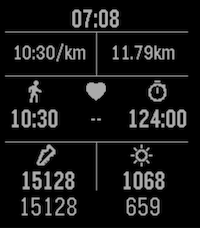
 Emery screenshots:
 Update alert!
ModusApps just released version 1.1 of RuckPebble!
Have added profiles - now when you open the app you can choose between one of three profiles that you’ve set up on the phone - these set the ruck weight, terrain and elevation grade
We can’t write back steps or calories to Pebble health stats so instead we maintain lifetime rucking calories and distance and this is viewable in settings
 Update alert!
ModusApps just released version 1.2 of RuckPebble!
When pressing down we now save the ruck details. You can see the latest ruck summary in the timeline and total ruck stats in settings
 Update alert!
ModusApps just released version 1.3.0 of RuckPebble!
Now displays setting page correctly
 Update alert!
ModusApps just released version 1.4.1 of RuckPebble!
Massive overhaul - look at GitHub page for explainer images
Update alert! ModusApps just released version 1.4.2 of RuckPebble!
Improve documentation
Update alert! ModusApps just released version 1.4.3 of RuckPebble!
If a ruck session has started and the user opens another app from the phone they’ll be prompted a minute later to see if they wish to continue or end the ruck
Update alert! ModusApps just released version 1.4.4 of RuckPebble!
• If a ruck session has been started but so steps taken in last two minutes then the user will be prompted to see if they wish to continue or end the ruck
• Support Pebble Round 2
 Update alert!
ModusApps just released version 1.5 of RuckPebble!
Auto pause & resume mode - when you stop moving for a minute your ruck will be paused. When you start walking again your ruck will resume. If you don’t want this behaviour you can turn it off in phone settings.
Access other apps during a ruck. Pressing Down > Watch returns to the watch face so you can open other apps. You can resume the ruck when you return back to RuckPebble.
If Auto pause & resume mode is active then the ruck will automatically resume a minute after leaving RuckPebble.