QuickRemind by Sinaware
 There’s a new watchapp on the Rebble App Store!
Go check it out in the App Store!
There’s a new watchapp on the Rebble App Store!
Go check it out in the App Store!
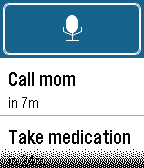
 Basalt screenshots:
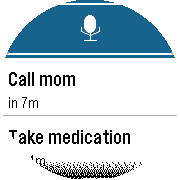
 Chalk screenshots:
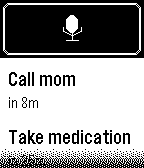
 Diorite screenshots:
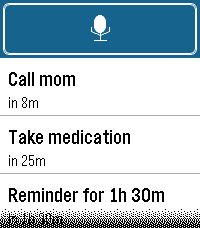
 Emery screenshots:
 Update alert!
 Sinaware just released version 1.1.0 of QuickRemind!
Hide touch buttons if there is no touch screen
 Update alert!
 Sinaware just released version 1.3.1 of QuickRemind!
Audible alarm
Reminders can now beep, not just vibrate. On Pebble Time 2 (built-in speaker) the alarm plays a classic Casio-style digital-watch burst (“pi pi pi pi”) that repeats until you dismiss it.
New Alert setting: Vibration only, Sound only, or Sound & vibration. Sound requires the Pebble Time 2 speaker; other models fall back to vibration so the alarm is never silent.
The Notification strength setting (Low / Medium / High) controls both buzz strength and beep volume.
Absolute clock-time remindersSay an exact time: “remind me at 3 pm to call mom”, “remind me at 5:30 pm”, or “remind me at 17:45” — it fires at the next time that clock reading occurs.
at (or @) switches from a relative delay (“in 5 minutes”) to an absolute time.
Supports 12-hour (am/pm) and 24-hour; without am/pm the soonest matching time is used.
Relative-delay reminders (“remind in X minutes/hours”) keep working unchanged.
Settings & polishCleaner configuration page: neutral trigger prefixes, automatic migration of older trigger lists, and clearer relative-vs-exact format examples.
The text after the time becomes the reminder title (trimmed to 48 characters).
 Update alert!
 Sinaware just released version 1.4.0 of QuickRemind!
Natural spoken clock times.
You can now say exact times the way people actually speak them: “remind me at eight past four”, “at quarter past four”, “at half past nine”, “at twenty past six”, “at ten to five” or “at quarter to five”. “a quarter past four” (with the leading “a”) works too.
These resolve to the next matching clock time, the same as the existing exact-time formats; add “am”/“pm” to pin a half of the day.
All previous formats are unchanged (“in X minutes”, “at 5:30 pm”, “at 17:45”, “@ 8”, “at five thirty”, etc.), and ambiguous phrases like “at four to call mom” still parse as 4:00 with the title “call mom”.
Settings page lists the new examples under Supported formats.
 Update alert!
 Sinaware just released version 1.5.0 of QuickRemind!
Optional dictation approval screen.
New Approve dictation setting on the configuration page. Default is No, which keeps the current behaviour: a recognised reminder is added automatically as soon as you finish speaking.
Set it to Yes to have the watch show the built-in review screen after dictation so you can confirm the transcript (or re-do it) before the reminder is created.
 Update alert!
 Sinaware just released version 1.6.0 of QuickRemind!
Selectable alert patterns (with real tunes) and a spoken-time fix.
New Alert pattern setting on the configuration page with 10 built-in styles. Vibration rhythms (Beep, Pulse, Nudge Nudge, Jackhammer, Gentle) work on every Pebble; five also play a real tune through the Pebble Time 2 speaker: Reveille, Mario, Ode to Joy, Twinkle Twinkle, and Für Elise.
On Pebble Time 2 each tune is mixed with an octave-below harmony voice for a fuller, polyphonic sound. On watches without a speaker, every pattern is felt as its vibration rhythm, so the alarm is never silent.
The repeating alarm now waits for a tune to finish before replaying it, so longer melodies no longer overlap or restart mid-phrase.
Fix: dictated times spoken as “p.m.”/“a.m.” (which the watch splits on the periods) are now recognized correctly — e.g. “remind me at 6:35 pm get milk” saves the reminder as “get milk” at 6:35 PM instead of leaving “pm” in the text. Plain “pm”/“am” continues to work as before.
Update alert! Sinaware just released version 1.7.0 of QuickRemind!
Turkish dictation support with a Settings language selector.
New Language setting on the configuration page. Choose English (default) or Turkish to tell the watch how to understand your spoken reminders.
Turkish parsing understands both relative delays (minutes and hours) and exact clock times, including spoken day-parts (morning / afternoon / evening). Numbers can be digits or words, and a trailing reminder verb is stripped from the reminder title.
Trigger phrases now have language-specific defaults. Switching the language swaps them to that language’s defaults, unless you have customised the list.
Recognition itself is done by your phone’s dictation service, so set your phone’s voice/dictation language to Turkish as well for the words to come through correctly — the watch only parses the returned text.
English parsing is unchanged.
 Update alert!
 Sinaware just released version 1.8.1 of QuickRemind!
Quick-launch dictation and optional timeline pins.
Quick launch dictation (new setting, default off) — when on, opening QuickRemind from a watchface quick-launch button starts voice dictation immediately instead of showing the reminder list. Say your reminder and you’re done. If a reminder is already due, the alarm still shows first.
Add to timeline (new setting, default off) — when on, every reminder you add is also placed on the Pebble timeline as a pin with its own reminder notification, and is removed from the timeline when the reminder fires or is deleted. Requires a phone connection so the pin can sync.
Both settings are off by default, so existing behaviour is unchanged unless you turn them on.
Update alert! Sinaware just released version 1.8.2 of QuickRemind!
uto-close after quick-launch dictation.
New Auto-close after dictation setting (default off). When on, finishing a quick-launch dictation returns you straight to the watchface instead of leaving the reminder list open — so a reminder is just a button-press, a sentence, and done. Only applies when Quick launch dictation is on; opening the app manually still shows your list as usual.
Update alert! Sinaware just released version 1.9.0 of QuickRemind!
You can now say a time with am/pm and skip the word “at” — “remind me 8am tomorrow to check printer ink” is understood as an exact time. Both the glued form (“8am”, “5pm”, “8:30pm”) and the spaced form (“8 am”) work.
New day words pin a reminder to a specific day: today, tonight and tomorrow in English, bugün and yarın in Turkish (e.g. “yarın sabah 8” / “yarın saat 15:30”). “tonight” also implies the evening.
Fixes a bug where an am/pm time without “at” (e.g. “8am tomorrow”) could be scheduled for the wrong half of the day (8 pm instead of 8 am).
The on-watch Supported formats help was updated for both languages.
Update alert! Sinaware just released version 1.9.1 of QuickRemind!
Fix: spoken “a.m.”/“p.m.” after a bare hour no longer corrupts the time and text.
Saying an exact hour followed by a spelled-out meridiem without a colon — e.g. “remind me at 8 a.m. to get printer ink” — now schedules 8:00 AM with the description “get printer ink”.
Previously the dictated “a.m.” (which the watch splits on the periods into “a” + “m”) was misread: the “a” was taken as the number 1, so the time became 8:01 and the leftover “m” was left glued to the front of the text (“m. to get printer ink”). The meridiem is now recognised before the minutes step so both tokens are consumed correctly.
Times with a colon (“8:00 a.m.”) and glued forms (“8am”) were unaffected and continue to work.
Update alert! Sinaware just released version 1.9.2 of QuickRemind!
Fix: reminders past the 4th were lost on restart, and a phantom “0m” alarm.
Update alert! Sinaware just released version 1.9.3 of QuickRemind!
Fix: timeline pins could silently stop appearing
Update alert! Sinaware just released version 1.10.0 of QuickRemind!
Spoken times now work: “at noon”, “at midnight” and “at midday” set a reminder, in English and Turkish (öğlen, gece yarısı).
Update alert! Sinaware just released version 1.11.0 of QuickRemind!
v1.11.0 — Reminders further out
Weekdays
“remind me this Friday at 10 am to do something” now schedules Friday. Previously the day was ignored entirely and you got the next 10 am — usually tomorrow.
Works with or without “on”/“this”/“next”, and before or after the time: “on Monday at 9 am”, “at 10 am on Friday”, “remind me Wednesday at 5:30 pm”.
“next week at 10 am” also works.
Turkish: full set with case endings — cuma, cumaya, cuma günü, pazartesiye, çarşamba, perşembe, cumartesi, pazar — plus haftaya, gelecek hafta, önümüzdeki cuma.
Uses the coming occurrence: said on a Tuesday, “Friday” is 3 days out. If the day is today and the time has already gone, it moves a full week on rather than to tomorrow.
Days and weeks“in 3 days” now means 3 days. It used to mean 3 minutes — days and weeks weren’t recognised units, so the number fell through to a “assume minutes” rule.
“in 2 weeks” likewise meant 2 minutes; now 14 days. Turkish 3 gün sonra, 2 hafta sonra too. Anything up to a year out.
“a” / “an” / “bir” no longer read as the number one“remind me at 10 a meeting” scheduled 10:01 and dropped the “a” from the title. Now 10:00, title intact.
Turkish “saat 10’da bir şey…” lost its “bir” the same way — same fix.
A reminder with no time at all no longer turns a leading “a”/“bir” into a stray 1-minute alarm; it declines instead.
“in an hour”, “in a minute”, “bir saat sonra” are unaffected — an article still counts as one when its unit follows it.
AlsoAbsurd delays (“in 10000 weeks”) are refused rather than overflowing into a random time.
Available on all four models (Pebble Time 2, Time, Time Round, Pebble 2).
Update alert! Sinaware just released version 1.11.1 of QuickRemind!
QuickRemind now has its own launcher icon instead of the default null icon
Update alert! Sinaware just released version 1.11.2 of QuickRemind!
Fixed: a reminder lost its text whenever the text was spoken before the time.
“Remind me to call Kelly at 5 p.m.” now saves “call Kelly” instead of an
untitled “Reminder for 3h 54m”. Both word orders work, in English and Turkish.
Update alert! Sinaware just released version 1.12.0 of QuickRemind!
• Fixed: reminders alerted twice when “Add to timeline” was on. Timeline
pins now offer “pin only” (used automatically) as well as “pin + alert”.
• Fixed: deleting a reminder now really removes its timeline pin, even if
you close the app right after.
• Fixed: auto-close no longer exits to the watchface when a dictation was
cancelled or misheard — the app stays open so you can retry.
• Auto-close returns to the watchface faster.
• Timeline pins left behind by an earlier install are now cleaned up.
• A reminder the watch can’t set an alarm for buzzes twice to tell you,
instead of failing silently.
Update alert! Sinaware just released version 1.12.1 of QuickRemind!
• A reminder that comes due opens the app over whatever you were on, so
dismissing it now closes the app again instead of leaving you in the
reminder list.
• Alarms that fire while the app is already open still return to the list.
• Several reminders due at once still play one after another.