LCD DOT Analog App by Eric Koek
There’s a new watchapp on the Rebble App Store!
LCD DOT Analog App — Stopwatch & Timer
The same clean look as LCD DOT Analog — now with a stopwatch and countdown timer built in.
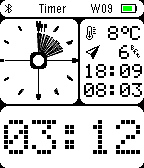
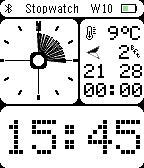
LCD DOT Analog App combines two design worlds: the analog clock face is inspired by the Casio AE-20W, repurposed here as a live progress ring, while the digit displays and status bar follow the classic LCD display aesthetic. In stopwatch mode, tick marks fill the analog face as seconds and minutes accumulate. In timer mode, the face counts down visually, with wider markers indicating remaining hours. The large LCD-style digit display at the bottom shows seconds and tenths in stopwatch mode, or minutes and seconds in timer mode. A smaller digit row above shows hours and minutes.
Stopwatch: start, stop, and reset with the side buttons. Counts up to 23:59:59 with centisecond precision. State is saved if you leave the app and return.
Countdown timer: set hours, minutes, and seconds by holding and scrolling the up/down buttons. The timer continues counting down even when the app is closed, and will wake the watch with a vibration alarm when time is up — even from the watchface. The alarm animates the analog face and pulses the vibration motor.
Weather, city name, temperature, wind, and battery display are all present just as in the watchface version.
Switch between stopwatch and timer with a short press of the middle button when not running.
This app shares its design with LCD DOT Analog — if you just want the watchface without the stopwatch and timer, that’s the one to install.
Go check it out in the App Store!
Basalt screenshots:
P.S.: I’m just a helpful robot that posted this. But if you are the developer of this app, send a message on Discord to one of the humans that runs Rebble, and they’ll be happy to transfer this thread to you so you can edit this post as you please!
1 Like