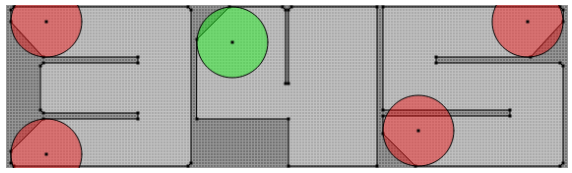
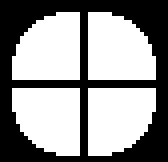
Hi, I’m trying to make pixel perfect rounded corners using PDC. But no matter what I try the arc is either correct for Basalt or semi correct for Aplite.
This is what I’m trying to get:
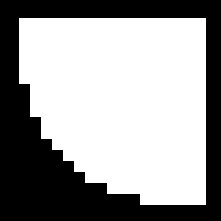
I got almost perfect result with second shape from this experiment:
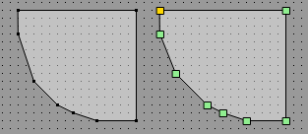
Link to PDC Editor with those shapes:
http://irek.gabr.pl/pdce.html?name=font1b.pdc&data=UERDSVoAAAABACcAEQACAAEAAAD%2FAAAIAAIAAQARAAEAEQAPAAwADwAJAA4ABwANAAQACgACAAQAAQAAAP8AAAgAFAABACQAAQAkAA8AHwAPABwADgAaAA0AFgAJABQABAA%3D
It gives good result for Basalt, but it’s one pixel off for Aplite:
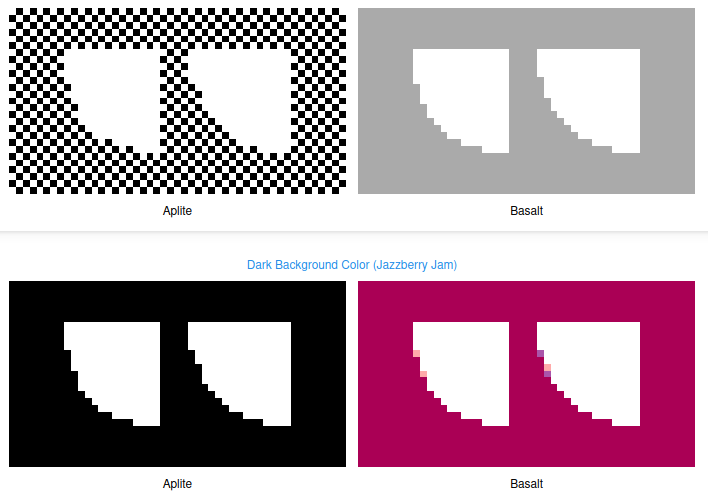
I tried a lot of combinations but the PDC rendering is very unpredictable. It seems to render differently in width than in height of the shape when there is no stroke. With stroke it’s easier to get expected shapes but then I get missing pixels on diagonal shapes. I tried doing that with Precise Paths using sub pixel precision but still, no success.
Is there an established way of drawing good arches? Or is this a lost cause?