Is anyone aware of a way to add custom fonts to a watchapp without converting from TTF? In my current watchface I pretty much reimplemented font rendering, since it didn’t seem like the SDK had a way to add a custom hand-drawn bitmap font, but I would prefer not to need that workaround.
1 Like
I might be wrong on that but I believe that there is no way to convert from bitmap font formats. According to documentation TTF is the only supported format.
In my watchfaces I always go for handmade solution with single bitmap image atlas of all glyphs and frame buffer. It’s straightforward when you support only ASCII characters without line wrap. It also makes it easy for me to apply dithering effects and render custom icons.
It would be nice to have support for bitmap font format like BDF as you not always have vector version of the font, especially when you are going for pixel perfect solution. I wander how Raster Gothic system font was generated.
1 Like
If you have a look at the firmware resource generation, especially for language packs, you will find that BDF is used and supported for fonts generation there, so adding SDK support wouldn’t be that hard. TTF fonts apparently can hold bitmap font data too, since one of the fonts in firmware also does that.
Have a look at the firefly fonts here:
3 Likes
Oh, that’s interesting. Supporting BDF directly in the build would be neat. And if you are saying that the build already will use bitmap strikes from a TTF, that is also interesting information…
1 Like
In the background it’s all freetype, and freetype supports these features 
2 Likes
I would love to be able to convert straight from bitmap fonts; I could finally do my iPod revival face concept (though I guess I can already do that using TTF as an intermediary, but that is less exciting)
1 Like
That might be a good first contribution to the firmware actually – I think the only change that has to be made is adding .bdf extension to this list:
You should also check if renaming the file to .ttf extension allows the BDF font to be used, that might not be intuitive, but from what I’m seeing it should technically work
2 Likes
Thanks for that, I can confirm that a BDF renamed to *.ttf works, and also that the change you suggested should work – I modified my installed SDK and was able to use a .bdf directly.
I’ll try to open a PR for PebbleOS shortly to make that change 
4 Likes
Amazing! I might try to use that in my current project.
BTW @soxfox42 how do you work with BDF? Did you draw font by hand or BDF was generated from something?
1 Like
To test the conversion I just used an existing freely available BDF. I’m not too happy with the available tools to be honest, I’ll most likely create an Aseprite extension when I actually start working with custom fonts.
2 Likes
The SDK change is merged, so the next SDK update from Core should support BDFs directly!
4 Likes
Hello! For the one interested, i’ve found this repository that i’ve extended to be able to create ttf fonts from images. I’m waiting the maintainer to accept my pull request. Meanwhile you can try it with my fork: GitHub - stefanopace/bitmap2ttf: Convert bitmap fonts to ttf fonts using font forge. .
This is what i’m using to create custom fonts for my watchface and it seems to work well.
I’m also curious, from a performance point of view (i mean battery charge duration), if it is easier to render the TTF fonts or the BDF ones, or if it will make no difference.
2 Likes
It doesn’t matter, the fonts are converted to a proprietary format when building an app or face.
2 Likes
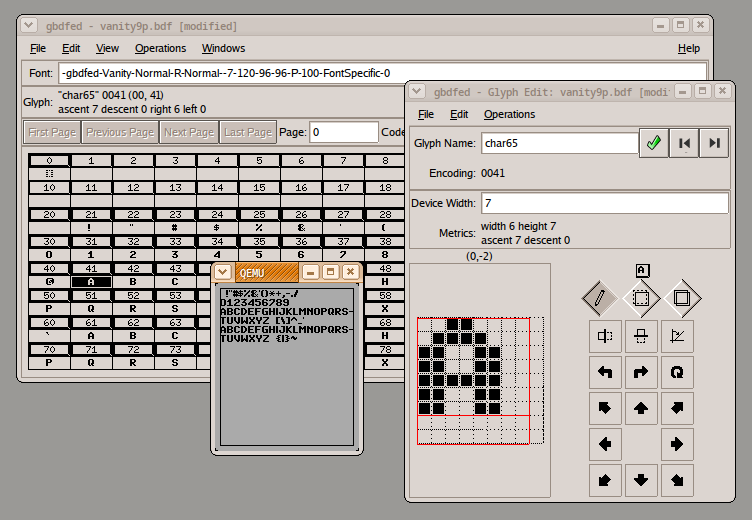
I got some good results using gbdfed. It crashed few times and I had to redraw all glyphs by hand. But it works.
Just be aware that font filename affects font build validation. If you have any number in font file name then build tool will assume this is your font height and will validate that during build. I had no idea and it took me many hours to figure this out. I had a random number in filename just for tests and my build was failing because of that.
3 Likes
It also took me an hour to figure out why my 7segments font was rendering with 7 pixel height 
3 Likes