SwitchBot Press
Control up to 6 SwitchBot devices from your Pebble with the UP, SELECT and DOWN buttons. Each button has a short press and a long press, so every slot can be a different device or command.
Features
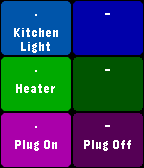
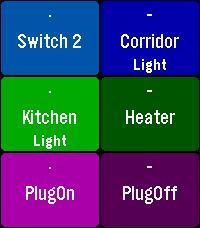
6 slots shown as a 2×3 grid of colored cards: short and long press on UP, SELECT and DOWN
Commands: press, turn on, turn off, toggle
Custom names of up to 20 characters per slot
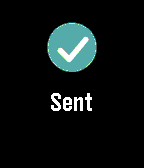
Vibration feedback, with a result screen showing Sent, Failed or Not Set
The backlight stays on for 30 seconds after launch
The app closes by itself after 30 seconds of inactivity
Setup
In the SwitchBot app, open Profile > Preferences, tap App Version 10 times, then open Developer Options and copy your Token and Secret.
Open the app settings in the Pebble app on your phone and enter the Token and Secret.
For each slot, enter the Device ID (the BLE MAC address shown in the device settings) and choose a name and a command.
Compatibility
Tested on real devices, with a SwitchBot Hub: SwitchBot Bot and SwitchBot Plug.
Bluetooth-only devices such as Bot and Curtain need a SwitchBot Hub to be reached through the cloud API. Operation without a Hub has not been tested.
Curtain should work with the same commands, but it has not been tested on a real device yet.
Robot vacuums such as the K10+ are not supported. They did not show up in the SwitchBot API in my tests.
Supported watches: Pebble Time 2 (emery) and Pebble Time / Pebble Time Steel (basalt).
Privacy and security
The only server the app talks to is the official SwitchBot API (api.switch-bot.com). There is no analytics, tracking or advertising, and no location or account data is collected.
Your Token and Secret are stored only inside the Pebble app on your phone. They are never sent to the watch or to anyone except SwitchBot, and they are not written to logs.
The watch only stores the slot names.
Like any app that stores credentials on a phone, the Token and Secret are not encrypted on the phone. Don’t use this app on a shared or untrusted phone.
This is an unofficial app and is not affiliated with SwitchBot. SwitchBot is a trademark of its owner.
Pebble の UP / SELECT / DOWN ボタンで、SwitchBot デバイスを最大 6 つ操作できます。各ボタンは短押しと長押しに対応していて、スロットごとに別のデバイスやコマンドを割り当てられます。
機能
6 スロットを 2×3 のカラーカードで表示します(UP、SELECT、DOWN それぞれの短押しと長押し)。
コマンドは press、turnOn、turnOff、toggle です。
名前は 1 スロットあたり 20 文字まで付けられます。
バイブで操作を知らせ、結果は Sent、Failed、Not Set の画面で表示します。
起動後 30 秒間はバックライトが点灯します。
30 秒操作がないと、アプリは自動で終了します。
設定方法
SwitchBot アプリで「プロフィール」>「設定」を開き、アプリバージョンを 10 回タップして開発者オプションを表示します。そこからトークンとシークレットをコピーします。
スマホの Pebble アプリで、このアプリの設定を開き、トークンとシークレットを入力します。
各スロットに、デバイス ID(デバイス設定に表示される BLE MAC アドレス)、名前、コマンドを設定します。
対応状況
SwitchBot Hub を使った環境で、Bot と Plug の実機動作を確認済みです。
Bot や Curtain のような Bluetooth 専用デバイスは、クラウド API 経由で操作するために SwitchBot Hub が必要です。Hub なしでの動作は未確認です。
Curtain は同じコマンドで動く見込みですが、実機では未確認です。
K10+ などのロボット掃除機は非対応です。確認した範囲では、SwitchBot API に表示されませんでした。
対応機種は Pebble Time 2(emery)と Pebble Time / Pebble Time Steel(basalt)です。
プライバシーとセキュリティ
通信先は SwitchBot 公式 API(api.switch-bot.com)だけです。解析、トラッキング、広告はなく、位置情報やアカウント情報も収集しません。
トークンとシークレットは、スマホの Pebble アプリ内だけに保存します。時計や SwitchBot 以外には送らず、ログにも出しません。
時計に保存するのは、スロットの名前だけです。
認証情報をスマホに保存するアプリと同じく、トークンとシークレットはスマホ内で暗号化されません。共有のスマホや信頼できないスマホでは使わないでください。
非公式アプリで、SwitchBot 社とは関係ありません。SwitchBot は各権利者の商標です。
 There’s a new watchapp on the Rebble App Store!
 Basalt screenshots:
 Emery screenshots: