HA Launcher by SHUred
 There’s a new watchapp on the Rebble App Store!
Go check it out in the App Store!
There’s a new watchapp on the Rebble App Store!
Go check it out in the App Store!
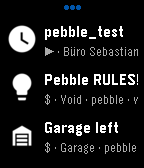
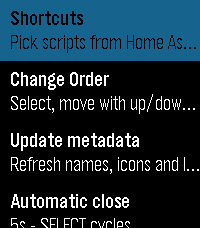
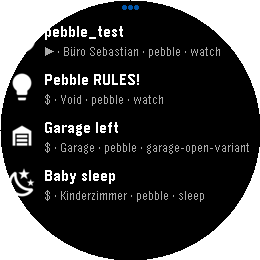
 Basalt screenshots:
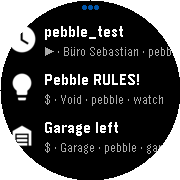
 Chalk screenshots:
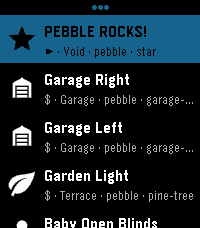
 Diorite screenshots:
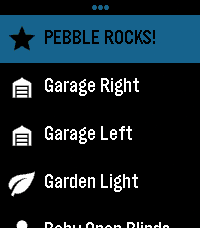
 Emery screenshots:
 Gabbro screenshots:
 Update alert!
SHUred just released version 0.6.0 of HA Launcher!
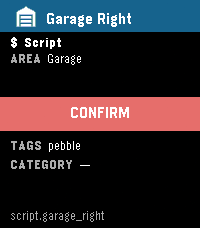
- Confirmation screen: shortcut icon above the prompt; confirm by pressing UP + DOWN together and releasing (BACK cancels)
- Watch vibrates on every shortcut launch and on every error/timeout
- New “Vibrations” sub-menu setting (ON/OFF) silences every haptic
 Update alert!
SHUred just released version 0.6.1 of HA Launcher!
- Touch ON by default — bare Touch toggle in the phone settings (no firmware-bug caveat text), watch-side default ON for fresh installs
- Pull-down to sub-menu (HeadeRSS pattern): arms only when the menu content is at its very top (real scroll offset, not the selection — same firmware quirk) and the finger starts in the top band; the 3-dot row
inverts as the armed cue; drag back up cancels; release-while-armed opens the sub-menu; rubber-band sheet + snap-back- Single tap fires a shortcut — CONFIRM shortcuts still stop at the UP+DOWN dialog (button-only: both pressed to arm, both released to execute, SELECT inert, BACK cancels — touch cannot confirm)
- Version/changelog/README finalized in the feature commit
Update alert! SHUred just released version 0.7.0 of HA Launcher!
- New “Label filter” sub-menu row (SELECT cycles All → every Home Assistant
label the last fetch saw); the picker then lists only scripts/scenes
carrying the chosen label, and blank lists everything, as before- The offered labels are the ones in use by scripts/scenes — the label
registry itself is websocket-only — so the row fills up after a fetch
(picker or “Update metadata”) and cycles All ↔ the stored label until then- The 32-shortcut cap now applies after filtering, so untagged entities can
no longer crowd tagged ones out of the list- Labels longer than 23 characters are not offered in the cycle: the row
would have to clip the name, and a clipped name matches nothing, so the
picker would empty with no visible reason- A stored label that HA later renames or deletes stays on the row for one
press and then cycles to All, instead of jumping to an arbitrary label- While a filter is active, kept-but-untagged shortcuts are neither re-added
to the picker as red rows nor marked missing (main screen included); clear
the filter to manage them
Update alert! SHUred just released version 0.8.0 of HA Launcher!
0.8.1
Hardening the two-page menu: no loading state, and no way for a fetch to
hang.
- Removed the “Fetching labels…” row hint and the state behind it. Nothing
waits on the label list, and a flag that only cleared when a reply arrived
meant an offline phone could leave the row claiming to fetch forever- Fixed the first-install label warm-up: the watch now hands the stored
config to the phone after a save (the JS only learned it onready), so
the labels request no longer fires against empty credentials. The refresh
moved to the phone side — one message each way, instead of two back-to-back
sends where the second could returnAPP_MSG_BUSYand be dropped- Picker and “Update metadata” now have a fetch watchdog (25s, above the
phone’s own 20s request timeout). Every failed hop was already reported,
but if the phone’s JS stopped mid-chain nothing came back and the picker
sat on “Fetching…” over a partial list; it now ends in “Fetch error”- The phone also reports a browse that stops mid-chain, instead of logging it
only- A failed label fetch no longer replies with an empty list: the watch keeps
its cached labels, so being away from home (or HA being down) cannot wipe
the filter choices0.8.0
The menu is two pages now, and the label filter loads itself.
- 3-dot menu split in two: Shortcuts (Pick shortcuts / Change Order /
Update metadata / Label filter) and Settings (Automatic close /
Info line / Vibrations) — everything that shapes the shortcut list sits
together, the display and haptic settings sit together- The label list is fetched when the Shortcuts page opens (labels only: one
request, no entity dump) instead of waiting for a manual picker or
“Update metadata” run, and it is cached in flash — so the row cycles your
labels on the first open, right after a restart, and once settings are
saved- Picker row renamed to “Pick shortcuts” so the page and its first row are
not both called “Shortcuts”; the row reads “Fetching labels…” while the
list is on its way- A failed label fetch replies with an empty list rather than nothing, so the
row falls back to All instead of claiming to fetch forever- Nothing to migrate: the stored label filter keeps working
 Update alert!
SHUred just released version 0.8.2 of HA Launcher!
0.8.2
- Opening the Shortcuts page and then tapping “Pick shortcuts” (or
“Update metadata”) straight away could collide: the second AppMessage send
returnedAPP_MSG_BUSYand the screen showed “Send failed” with an empty
picker, with no way forward but BACK. A busy outbox is now retried once
after 300ms; only a second busy or a real send error is reported- The fetch watchdog now fires on any request that never finished. Its
previous check (“entries received >= expected”) was also true before the
first reply, so it bailed out in the worst stall — the phone dying before
it ever sent the count- “Update metadata” against a Home Assistant with no scripts or scenes now
finishes and reports; the dialog used to sit on “Updating…” forever,
waiting for entries that were never coming- A pending send retry is cancelled when the picker closes